Modern enterprises increasingly rely on real-time, governed, and secure data sharing to power analytics, AI models, and downstream operational workflows. As organizations accelerate their adoption of Databricks for advanced analytics and data engineering, the need to move high-quality, trusted, 360-degree and AI-ready data from Reltio to Databricks—without copying, without pipelines, and without security trade-offs—becomes critical.
At Reltio, we’ve designed a seamless and highly secure integration with Databricks using Delta Sharing, the industry’s open, cross-cloud protocol for data sharing. This integration gives Reltio customers direct, efficient, and governed access to their Reltio Data in Databricks—while ensuring security at every layer.
This blog explains how Reltio secures data when sharing it with Databricks and what happens behind the scenes so Reltio customers don’t have to worry about infrastructure complexity or security risks.
Reltio’s Architecture for Secure Data Sharing with Databricks
When customers connect Databricks to Reltio, they leverage Delta Sharing, which acts as a secure bridge between:
-
Reltio’s governed, trusted and real-time AI-ready data
-
Databricks’ Lakehouse Platform, powered by Unity Catalog and Delta Lake
Reltio’s reference architecture for Databricks integration is available here. Reltio automates all aspects of sharing setup and secure data access, making the integration operationally efficient and enterprise-ready.
How Delta Sharing Works: A Secure, Open Protocol
Databricks’ Delta Sharing protocol—first introduced here, provides a cloud-agnostic, REST-based method for sharing data without creating copies or requiring data movement. Reltio uses this protocol under the hood to share Delta Lake tables with customer-owned Databricks workspaces.
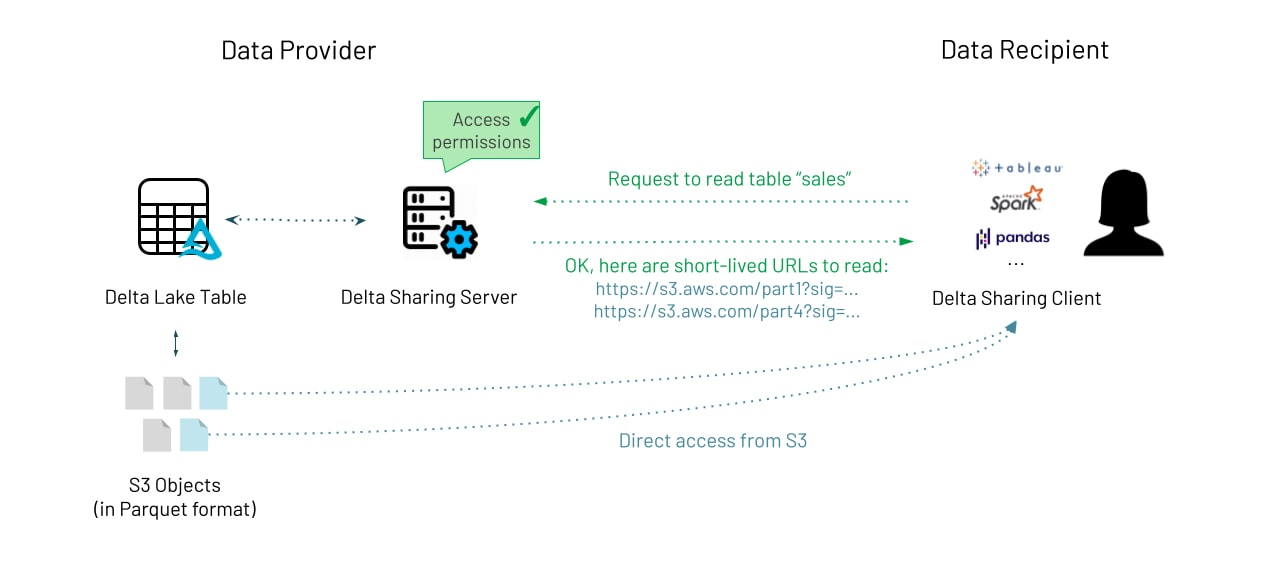
Let’s break down the exact sequence of events.
-
Provider (Reltio) creates a share: Unity Catalog assigns a share identifier. This simply defines what can be shared—no access yet.
-
Provider creates a recipient: Databricks generates a recipient token. This token represents who can access the share.
-
Provider grants access: The share is assigned to the recipient. The token is now authorized to access the shared tables.
-
Consumer (customer’s Databricks) uses the recipient token: The consumer workspace authenticates against the Delta Sharing REST API.
-
Delta Sharing server validates and logs the request: Databricks checks permissions, logs the access, and prepares the response.
-
Short-lived pre-signed URLs are issued: The server generates temporary, revocable pre-signed URLs to cloud object storage (ADLS, S3, or GCS). These URLs grant read-only access to the exact files needed.
-
Data flows directly from cloud storage to the consumer with no performance bottleneck : Transfers occur in parallel for massive throughput.
Transport-Level Security: How Data Stays Secure in Transit
Even though Delta Sharing uses public endpoints, all communication is secured end-to-end:
-
TLS 1.2+ encryption for all metadata and data transfer
-
Short-lived, cryptographically signed SAS URLs
-
Time-limited pre-signed file URLs
-
Authentication enforced via Delta Sharing tokens
-
No exposure of storage account keys
-
No lateral access to cloud storage
Even though the data may traverse the public internet, it is:
This gives Reltio customers the confidence that data remains secure regardless of the network path.
Why Delta Sharing Uses Public Endpoints
Delta Sharing is intentionally designed to be:
To preserve interoperability, the protocol uses public REST endpoints, not:
Even when both workspaces are on the same cloud, Delta Sharing maintains open protocol compatibility by using public HTTPS endpoints and SAS URLs.
What If the Consumer Databricks Workspace Uses a Private Link?
Private Link restricts inbound access to:
-
Databricks workspace UI
-
Databricks REST APIs
-
Control plane traffic
However: Delta Sharing does NOT use the workspace control plane. It uses an independent, publicly reachable Delta Sharing server.
Therefore:
-
Workspace may require Private Link
-
Delta Sharing still uses public outbound HTTPS
-
No Private Link configuration is needed for Delta Sharing
Outbound HTTPS traffic is still allowed unless the customer enforces special egress restrictions. Private Link restricts inbound, not outbound traffic.
Delta Sharing With Fully Restricted Outbound Egress
If a customer blocks all outbound internet access—common in highly secure environments—then Delta Sharing cannot function.
Specifically, the consumer must reach:
If outbound egress is blocked:
-
No metadata exchange
-
No file access
-
No SAS URL retrieval
This is the only scenario where Delta Sharing fails.
However, customers can still securely enable Delta Sharing with strict networking policies. To support both Private Link and secure data sharing:
Allow selective outbound HTTPS egress to:
-
The Delta Sharing public server endpoint
-
Cloud storage accounts hosting the data
This approach preserves:
-
Private access to the Databricks workspace
-
Secure data-sharing capability
-
Control over what leaves the network
How Reltio Simplifies All This for Customers
Everything described above is automatically handled by Reltio and Databricks.
Reltio customers get:
-
A seamless Databricks integration
-
Governed access via Unity Catalog
-
No pipeline development
-
No infrastructure configuration
-
No security complexity
Reltio ensures that:
-
Data stays secure
-
Access is revocable
-
Governance is preserved
-
Performance is optimized
All the heavy lifting is done behind the scenes.
Reltio’s partnership with Databricks, powered by Delta Sharing, delivers a modern, secure, and cloud-agnostic way for enterprises to unlock the value of their master data—without copying, without pipelines, and without sacrificing governance or security. Reltio ensures the integration remains secure, scalable, and enterprise-ready.