But if you want to pursue this further, I think its going to take a support ticket.
Original Message:
Sent: 03-02-2026 05:56
From: Klaudia Augustin
Subject: DVF on attributes with multiple values
Hi Gino,
I did as you proposed and followed the syntax (blank or not) as described in the documentation, but still I get this error:
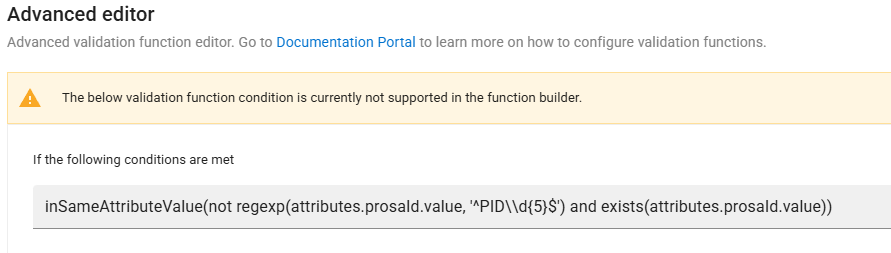
But it is so weird, that the DVF works correctly.
Kind regards
Klaudia
------------------------------
Klaudia Augustin
Bayer AG
Monheim
------------------------------
Original Message:
Sent: 02-27-2026 10:44
From: Gino Fortunato
Subject: DVF on attributes with multiple values
Hi Klaudia,
I was no able to reproduce the error. This points to either a hidden character (space at beginning or end?) or some kind of system glitch.
If you are sure there are no hidden characters, I would delete and recreate the rule.
Hope that helps.
gino
------------------------------
Gino Fortunato
Principal Solution Engineer
Reltio
Original Message:
Sent: 02-26-2026 09:17
From: Klaudia Augustin
Subject: DVF on attributes with multiple values
One addition:
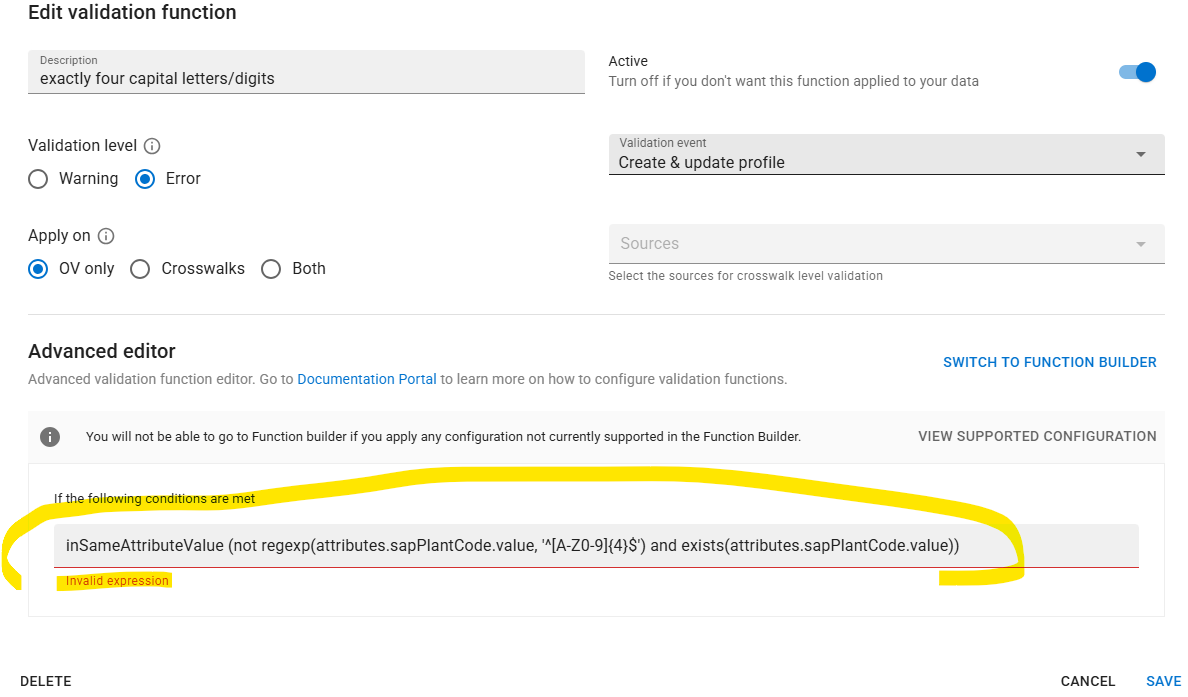
I get this error but can save it and it also works. What's wrong in my expression?
------------------------------
Klaudia Augustin
Bayer AG
Monheim
Original Message:
Sent: 02-26-2026 08:45
From: Klaudia Augustin
Subject: DVF on attributes with multiple values
Hi Gino,
in the meantime I succeeded in building up an advanced query in DVF. I was struggling with the fact that the function "inSameAttributeValue" needs two parameters...
Thanks a lot for your help!
------------------------------
Klaudia Augustin
Bayer AG
Monheim
Original Message:
Sent: 02-25-2026 16:51
From: Gino Fortunato
Subject: DVF on attributes with multiple values
Hi Kaudia,
its simpler than it looks.
1) Click on the 'switch to advanced editor' link
2) in the expression line, wrap what ever is there with the inSameAttributeValue function, just like in the example. Whatever you have there already goes inside a set of parentheses. Just like the example, it goes within some double quotes: "inSameAttributeValue(yourFunctionHere)"
3) click save
------------------------------
Gino Fortunato
Principal Solution Engineer
Reltio
Original Message:
Sent: 02-24-2026 07:34
From: Klaudia Augustin
Subject: DVF on attributes with multiple values
I don't know what exactly to enter in the "Advanced query editor" line. It has to be in JSON format as I see in the documentation. Could you please tell me the JSON expression which is for my condition (see screenshot) suitable? So, that it checks every value of the attribute "ProSA ID" and not only one. Thanks!
------------------------------
Klaudia Augustin
Bayer AG
Monheim
Original Message:
Sent: 02-23-2026 10:58
From: Gino Fortunato
Subject: DVF on attributes with multiple values
that's great! I thought that was the default config now.
but i'm unclear what assistance you need. Getting to the advanced editor is a function of clicking on the 'switch to advanced editor' link visible in your screenshot above
------------------------------
Gino Fortunato
Principal Solution Engineer
Reltio
Original Message:
Sent: 02-23-2026 10:52
From: Klaudia Augustin
Subject: DVF on attributes with multiple values
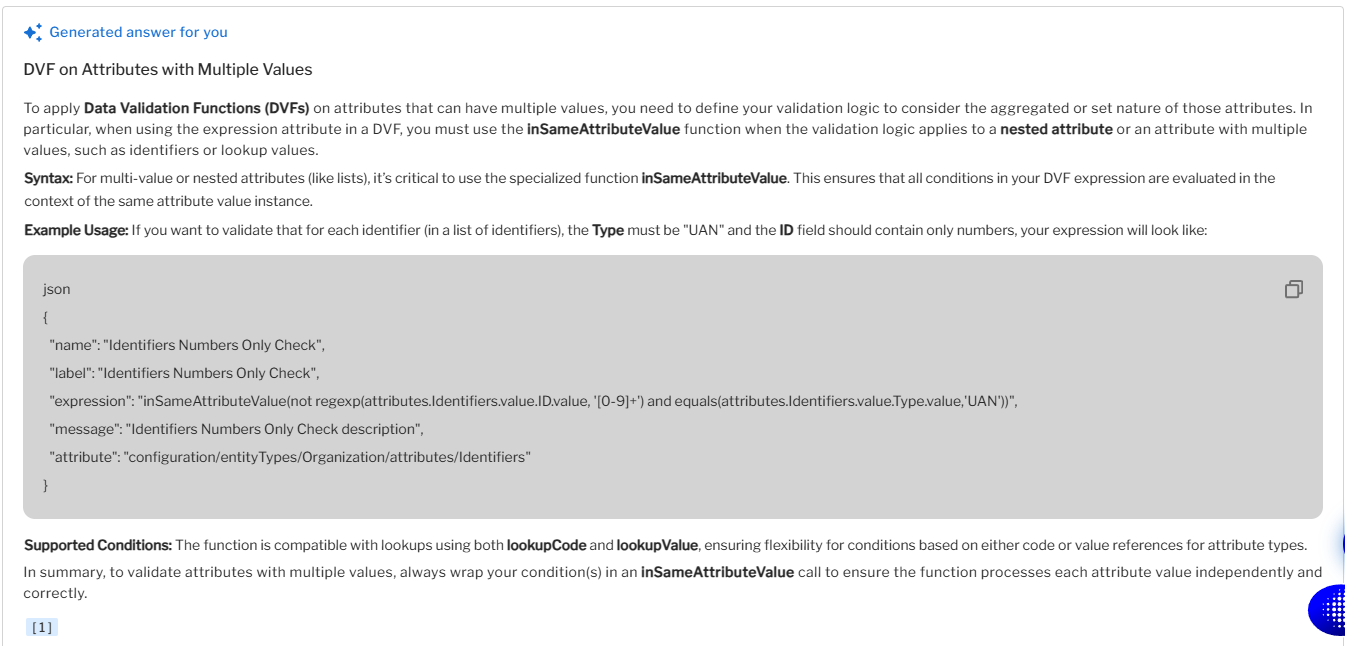
In the Reltio documentation I already found this explanation, but I don't know how to apply it in the Advanced Editor of my DVF.
------------------------------
Klaudia Augustin
Bayer AG
Monheim
Original Message:
Sent: 02-23-2026 10:44
From: Gino Fortunato
Subject: DVF on attributes with multiple values
I believe that is the expected behavior. If its not working that way for you, I'd suggest submitting a ticket to support
------------------------------
Gino Fortunato
Principal Solution Engineer
Reltio
Original Message:
Sent: 02-23-2026 10:11
From: Klaudia Augustin
Subject: DVF on attributes with multiple values
Thanks Snehil for your answer.
I only want to apply the DVF on operational values. I have an attribute which may store several values, all are OV. The validation check should run on all these different values and throw an error if at least one does not fulfill the regex.
------------------------------
Klaudia Augustin
Bayer AG
Monheim
Original Message:
Sent: 02-23-2026 05:40
From: Snehil Kamal
Subject: DVF on attributes with multiple values
Hi Klaudia,
I think you are observing this behavior because DVF rules, by default, apply to only ov:true values. However, you can change this behavior using the applyOn parameter. See the documentation below:
https://docs.reltio.com/en/objectives/cleanse-and-verify-data/data-cleansing-at-a-glance/data-cleansing-operation/define-data-validation-functions/apply-data-validation-functions-at-crosswalk-level
------------------------------
Thanks,
Snehil Kamal
Senior Staff Forward Deployed Engineer
Reltio
Bangalore